Windows Updates are generally issued with the intention of improving your user experience, but sometimes they can cause complications. This is why most IT departments will opt out of implementing them and will instead review the issued updates before doing the work themselves. However, for the average PC user who simply wants to postpone updates from interrupting your day, read on and find out what you can do about them.
Keep in mind that there is no way for the average consumer to completely stop Windows Updates without sacrificing important updates meant to either enhance security or improve the user experience. The tool provided by Windows won’t completely disable or block updates, but it can keep specific parts of updates from being installed.
This tool is called Show or Hide Updates from Windows. To get started, you’ll need to download the tool from Microsoft. Do so by going here: https://support.microsoft.com/en-us/help/3073930/how-to-temporarily-prevent-a-driver-update-from-reinstalling-in-windows-10
About halfway down the page you will see a link for: Download the “Show or hide” troubleshooter package now. Click on it.
Once you’ve downloaded the tool, go ahead and open it. A box will now open requesting to scan your system for updates. Do so by clicking Next.
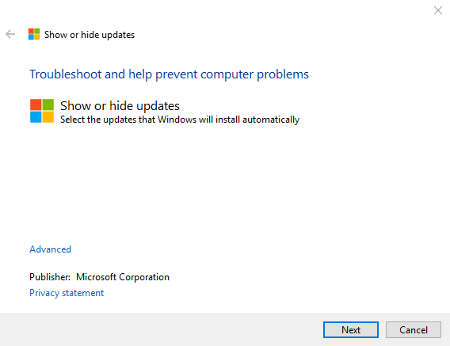
Once this scan is complete, a box will open called Show or hide updates. Click Hide updates and select the updates that you don’t want installed.
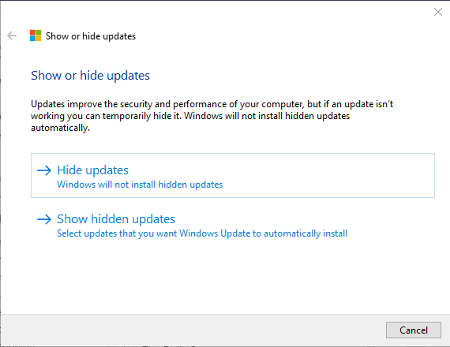
This tool can be used to keep small issues like driver updates or otherwise from installing and causing problems. Better yet, you can wait until the latest versions of these drivers have been released so that you can then bypass the installations that were causing the problems in the first place.
Of course, if talk of Windows Updates and drivers is all Greek to you, it might be better to leave the management of this technology to professional technicians. If your business doesn’t have an in-house IT department dedicated to managing and maintaining its critical assets, Suffolk Computer Consultants would be happy to help. We’re all about proactive technology maintenance, and we know how your organization can get the most out of its updates or keep them from interfering with your organization’s operations.
To learn more about how to get the most out of your business’s technology, reach out to us at (631) 905-9617.



Comments